Introduction
YouTube Shorts have emerged as a powerful tool for brands aiming to capture attention in today’s fast-paced digital landscape. These brief, engaging clips not only cater to a mobile-first audience but also present a unique opportunity for creators to enhance visibility and foster engagement. As competition intensifies, brands must ask: how can they effectively navigate the intricacies of creating compelling Shorts that resonate with viewers and drive conversions? This guide delves into essential steps and strategies for mastering YouTube Shorts, empowering creators to harness this dynamic format to its fullest potential.
Understand YouTube Shorts: Key Features and Benefits
YouTube clips, specifically Shorts, are brief videos designed for rapid, viewing, and if you're wondering how do you , they are capped at 60 seconds. Why should brands care? Here are the key features:
- Vertical Format: Optimized for mobile devices, Shorts deliver an easy-to-consume experience on the go.
- Discovery: Featured in a specialized video feed, they significantly enhance the opportunity to connect with new audiences.
- Engagement Tools: Creators can utilize music, effects, and text overlays to enrich their videos, making them more appealing.
What are the benefits?
- : Brands can achieve substantial exposure and attract new subscribers through engaging Shorts.
- : This format encourages rapid content production, enabling brands to understand while experimenting with diverse ideas and trends.
- : As the platform evolves, monetization avenues for short videos are expanding, including ads and sponsorships.
- : Videos featuring polls or Q&As see 26% greater interaction, establishing them as a powerful means for engagement.
In 2025, 43% of U.S. ad purchasers are actively investing in , recognizing their potential for marketing. The largest viewer demographic for the platform's short videos is aged 25 to 34, making it crucial for brands targeting this age group. Thriving brands are integrating short video content into their strategies, reporting up to 20% higher conversions when adopting a 'short video-first' approach. Regular use of not only boosts subscriber growth but also enhances channel performance. With over 2 billion monthly users and 90 billion daily views, the video platform's short-form content is not just a visibility tool; it’s an essential component of a brand's digital strategy, fostering engagement and driving revenue expansion.

Set Up Your YouTube Account for Shorts Creation
To , follow these essential steps to set up your account:
- Create a : If you don’t have one, visit the platform and sign up using your Google account.
- : Navigate to your account settings and via phone number. A channel must have a to qualify for verification on the platform. Verification aids in combating duplication and , greatly enhancing visibility and credibility among audiences. The verification badge signifies a credible channel and provides access to unfiltered features. Submitting an application for verification is free of charge, and the review process can take several days to weeks.
- (Optional): If you intend to , ensure you satisfy the platform's eligibility criteria, which involve having a or 10 million video views in the last 90 days. in your account settings to start earning from your content.
- : For mobile creation, download the video platform app from the App Store or Google Play Store, as this is where most short videos are created and shared.
- Familiarize yourself with the interface by exploring the app to understand how do you and where the Shorts creation tools are located. Engaging with the community through comments and polls can also enhance your channel's reputation and increase your chances of verification in the future. Remember, "the opportunity to obtain verification will come if you continue building, creating, and engaging with your channel.

Create Your First Short: Step-by-Step Process
If you're wondering how do you , you'll find that is a straightforward process that can significantly enhance your brand's visibility. Follow these :
- Open the video platform app: Launch the app on your mobile device.
- Tap on the Create Button: Look for the plus (+) icon to begin your journey.
- Choose 'Create a Brief': This option directs you to the camera interface designed for brief videos.
- Record Your Video: Press and hold the capture button to record, or tap it to start and stop. You can create multiple clips for a .
- Add Music or Effects: Enhance your video by incorporating trending music and visual effects. Research shows that , with YouTube Shorts boasting an as of early 2025.
- Preview Your Clip: Review your video to ensure it aligns with your vision and quality standards.
- Save Your Short: Once satisfied, save your video to proceed to the editing phase.
Brands like ESPN and Graza effectively leverage the by integrating captivating material with popular music and effects, capturing audience attention and driving interaction. For instance, Graza's recipe videos not only promote their products but also provide valuable content to viewers. By following these steps, you can learn how do you that harness the platform's potential and resonate with your audience. Additionally, consider posting on Sundays, identified as the .

Edit and Enhance Your Short: Tools and Techniques
can significantly . Here’s how to do it effectively:
- : After recording, access the directly in the app. This feature allows for immediate adjustments, ensuring your content is polished right from the start.
- : Cut unnecessary parts to keep your video brief and engaging. A concise video retains viewer attention and delivers your message more effectively.
- : Use text to emphasize key points or add context to your video. This not only aids comprehension but also enhances the overall viewing experience.
- Incorporate Music: Choose from to . The right music can elevate the emotional impact of your video.
- : Experiment with various filters to enhance the visual appeal of your video. A well-chosen filter can transform the mood and style, making your content more captivating.
- : Always preview your edited content to ensure everything flows well before finalizing. This step is crucial for maintaining quality and coherence in your final product.

Publish and Promote Your Short: Best Practices
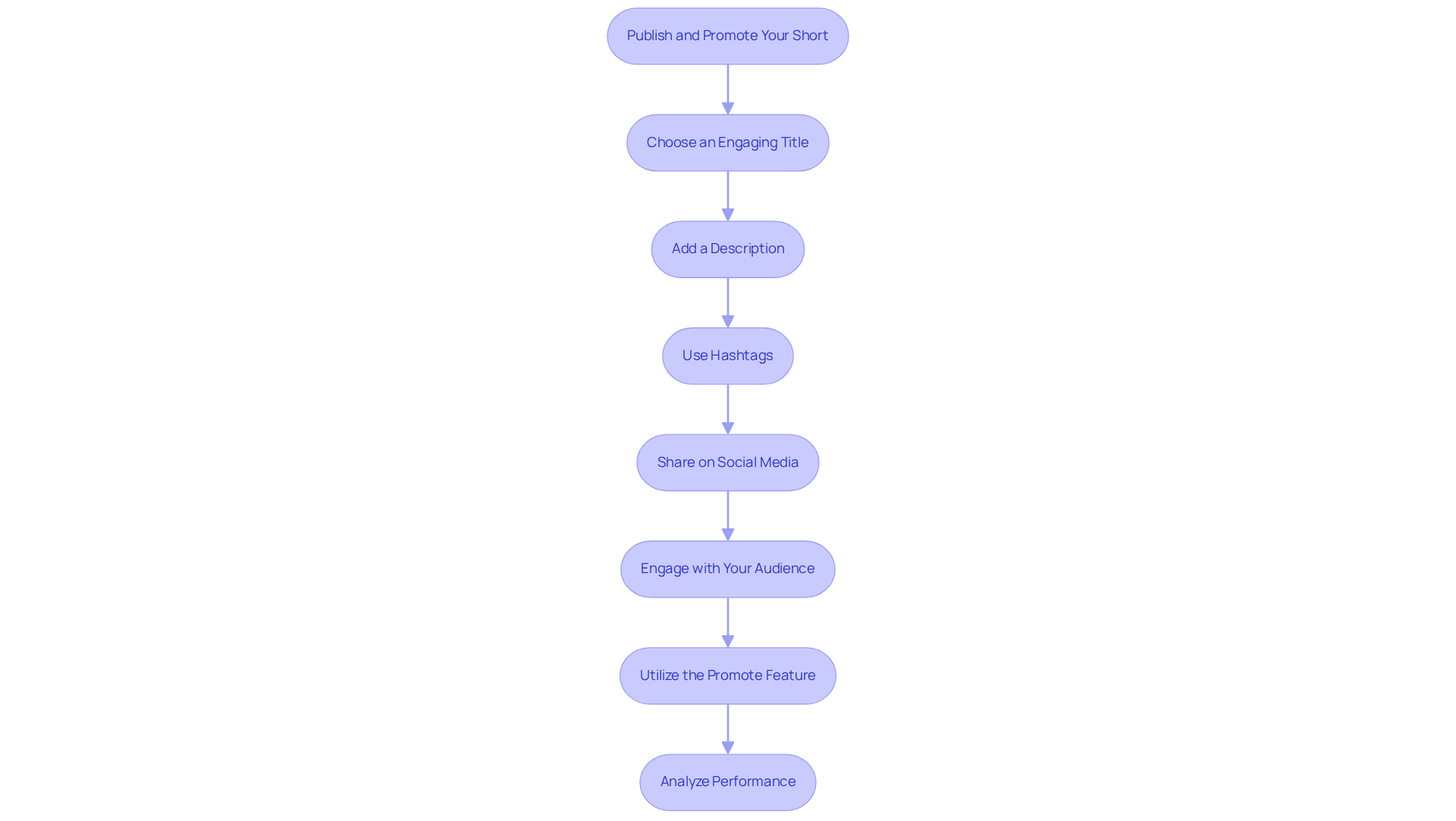
Once your Short is ready, implement these and promoting:
- Choose an Engaging Title: Craft a catchy and relevant title that captures viewer interest. Compelling titles are essential for .
- Add a Description: Write a concise description summarizing your Short while incorporating relevant keywords. This provides context and encourages viewer interaction.
- Use Hashtags: Leverage popular hashtags, such as #Shorts and #, to enhance discoverability. Strategic use of hashtags can significantly increase your content's reach.
- Share on : Promote your video across your other platforms to drive additional traffic. Cross-promotion taps into different audience segments and boosts engagement.
- : Actively respond to comments and encourage viewers to like and share your video. Engaging with your audience fosters community and can lead to increased loyalty and viewership.
- Utilize the : The platform has introduced a feature that allows you to promote your Shorts directly from the three-dot menu next to the video. This amplifies your reach without needing expertise in Google Ads.
- : Utilize to monitor your Short's performance. Track metrics such as views, likes, and engagement rates to refine your strategy and optimize future content.
By adhering to these methods, you can effectively improve the visibility and influence of your Shorts. With the platform currently experiencing over , focusing on organic growth is essential to meet the .
Conclusion
Creating YouTube Shorts is not just a strategy; it’s an essential move for brands aiming to boost visibility and connect with a wider audience. This guide has highlighted the unique features and benefits of Shorts, showcasing their mobile-first design and the potential for heightened audience interaction. By mastering this format, creators can tap into a rapidly expanding segment of the video market.
The article has laid out a clear, step-by-step process for establishing a YouTube account, crafting Shorts, editing, and promoting them effectively. Key insights include:
- The significance of engaging titles
- The strategic application of hashtags
- The importance of fostering audience interaction
By adhering to these guidelines, brands can produce compelling content while optimizing their reach and engagement on the platform.
Ultimately, embracing YouTube Shorts transcends mere trendiness; it stands as a vital element of contemporary digital marketing. As the platform evolves, brands that prioritize short-form video content are likely to experience enhanced subscriber growth and improved conversion rates. Now is the time to engage with YouTube Shorts and unlock the potential for creativity, engagement, and revenue growth.
Frequently Asked Questions
What are YouTube Shorts?
YouTube Shorts are brief videos capped at 60 seconds, designed for rapid, mobile-first viewing, optimized for easy consumption on mobile devices.
What are the key features of YouTube Shorts?
The key features include a vertical format optimized for mobile, enhanced discovery through a specialized video feed, and engagement tools like music, effects, and text overlays to enrich videos.
What benefits do brands gain from using YouTube Shorts?
Brands can achieve increased visibility, quick content creation, monetization opportunities, and enhanced audience engagement through interactive features like polls and Q&As.
How can brands increase their visibility using Shorts?
By creating engaging Shorts, brands can attract new subscribers and achieve substantial exposure, as the platform's short-form content is an essential component of a digital strategy.
What is required to set up a YouTube account for Shorts creation?
To set up an account, you need to create a video-sharing account, verify it via phone number, and optionally enable monetization if you wish to generate revenue from your videos.
How do I verify my YouTube account?
To verify your account, navigate to your account settings and follow the instructions. A minimum of 100,000 subscribers is required for verification, which enhances visibility and credibility.
What are the monetization requirements for YouTube Shorts?
To enable monetization, you must have at least 1,000 subscribers or 10 million video views in the last 90 days.
Where can I create YouTube Shorts?
You can create YouTube Shorts primarily through the YouTube mobile application, which can be downloaded from the App Store or Google Play Store.
How can I familiarize myself with the YouTube Shorts creation tools?
You can explore the app to understand the interface and locate the Shorts creation tools, as well as engage with the community to enhance your channel's reputation.
List of Sources
- Understand YouTube Shorts: Key Features and Benefits
- socialbee.com (https://socialbee.com/blog/youtube-updates)
- awisee.com (https://awisee.com/us/blog/youtube-shorts-statistics)
- demandsage.com (https://demandsage.com/youtube-shorts-statistics)
- resourcera.com (https://resourcera.com/data/social/youtube-shorts-statistics)
- zebracat.ai (https://zebracat.ai/post/youtube-shorts-statistics)
- Set Up Your YouTube Account for Shorts Creation
- monkoutsourcing.com (https://monkoutsourcing.com/blog/youtube-verification)
- 40 YouTube stats marketers need to know in 2026 (https://blog.hootsuite.com/youtube-statistics)
- thesocialshepherd.com (https://thesocialshepherd.com/blog/youtube-statistics)
- stackinfluence.com (https://stackinfluence.com/youtube-shorts-monetization-in-2025)
- globalmediainsight.com (https://globalmediainsight.com/blog/youtube-users-statistics)
- Create Your First Short: Step-by-Step Process
- resourcera.com (https://resourcera.com/data/social/youtube-shorts-statistics)
- onstipe.com (https://onstipe.com/blog/how-to-create-viral-youtube-shorts-in-2025-a-step-to-step-guide)
- adobe.com (https://adobe.com/express/learn/blog/you-tube-shorts)
- bloggingwizard.com (https://bloggingwizard.com/youtube-shorts-statistics)
- riverside.com (https://riverside.com/blog/how-long-can-youtube-shorts-be)
- Edit and Enhance Your Short: Tools and Techniques
- zebracat.ai (https://zebracat.ai/post/youtube-shorts-statistics)
- socialmediatoday.com (https://socialmediatoday.com/news/adobe-adds-youtube-shorts-creation-elements-premiere-app/804038)
- socialrotation.com (https://socialrotation.com/short-quotes-about-why-video-generates-more-engagement)
- project-aeon.com (https://project-aeon.com/blogs/the-complete-guide-to-text-overlays-for-video-essential-strategies-that-drive-engagement)
- adamconnell.me (https://adamconnell.me/youtube-shorts-statistics)
- Publish and Promote Your Short: Best Practices
- searchenginejournal.com (https://searchenginejournal.com/youtube-lets-channels-boost-shorts-videos/540089)
- socialmediatoday.com (https://socialmediatoday.com/news/youtube-shorts-creation-tips/744944)
- zebracat.ai (https://zebracat.ai/post/youtube-shorts-statistics)
- adamconnell.me (https://adamconnell.me/youtube-shorts-statistics)